
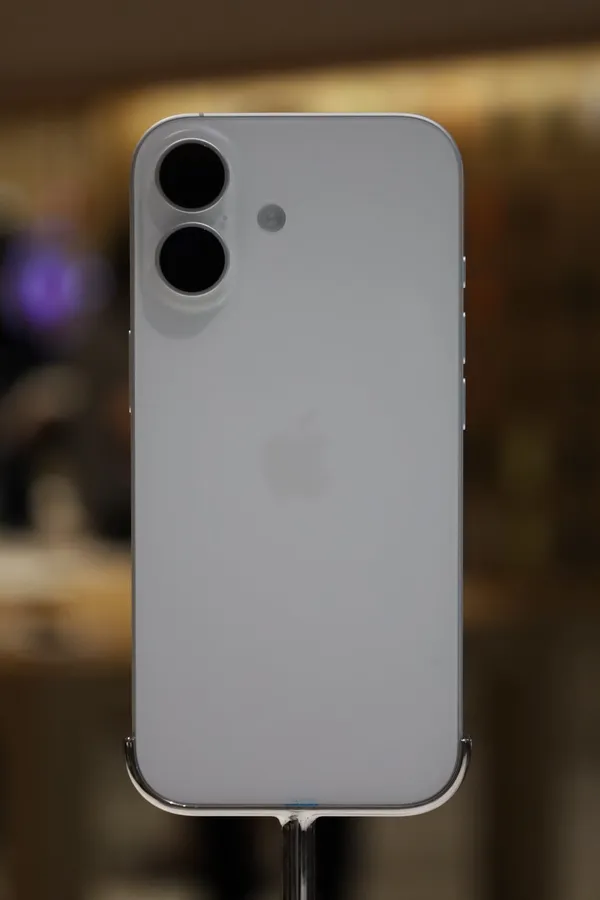

If you are trying to work out which cable, charger and case to buy for an iPhone 17, or you just want the facts in one place, this page pulls them together from Apple’s own documents and links out for everything else. Every number below is traced to a source listed at the bottom of the page.
Key specs
| Release date | 2025-09-19 |
|---|---|
| Status | Current lineup |
| Charging port | USB-C |
| USB spec | USB 2 (up to 480 Mb/s) |
| Wireless charging | Qi2, MagSafe |
| Charger in box | No |
| Display type | OLED |
| Display size (in) | 6.3 |
| Refresh rate (Hz) | 120 |
| Chip | A19 |
| Storage options | 256GB, 512GB |
| Launch price (USD, MSRP) | $799 |
Two details are worth reading closely. First, the table shows “Charger in box: No” because Apple’s In the Box list names only the phone, a USB-C charge cable and documentation. Second, the wired charging row is blank on purpose: Apple publishes a fast-charge claim rather than a maximum wattage, and we do not guess a number. That claim is covered in the charging section below.
Where does the iPhone 17 fit?
Apple introduced the iPhone 17 alongside the iPhone Air, iPhone 17 Pro and iPhone 17 Pro Max. Its newsroom announcement says pre-orders began on Friday, September 12, 2025, with availability beginning on Friday, September 19, and the launch-day post confirms the new iPhone family arrived in Apple Stores that day. It launched at $799 in the US with 256GB as the starting capacity, which Apple describes as double the entry storage of the previous generation, plus a 512GB option. Colors are black, white, mist blue, sage and lavender.
It has also been the phone people actually bought. Counterpoint Research’s Global Handset Model Sales Tracker put it first worldwide in Q1 2026, and 9to5Mac’s report of the Q2 2026 data shows it first again with 6% of global unit sales. For the United States, a report citing the same tracker gives it a 14% share in Q2 2026, ahead of the iPhone 17 Pro Max and iPhone 17 Pro. That popularity is why this page sits at number one in our library. See the Apple hub for the rest of the lineup.
What cable does the iPhone 17 use?
The iPhone 17 has a single USB-C connector. According to Apple’s specifications, that port supports charging, DisplayPort and USB 2 data transfer at up to 480 Mb/s. The box includes a 1 m USB-C charge cable.
Two practical points follow. The connector is reversible, so there is no wrong way up; our USB-C explainer covers what the USB-IF says about the plug. And the plug shape does not decide speed. Because Apple lists USB 2 for this phone, a cable rated for faster USB 3 speeds will not make transfers faster than 480 Mb/s on the iPhone 17 itself. If you want to see how the official speed tiers compare, read USB 2.0 vs USB 3.x speeds.
The same port can send video out. Apple says the iPhone 17 supports video mirroring and video out up to 4K HDR through native DisplayPort output over USB-C. If you already own Lightning accessories, Apple sells a USB-C to Lightning adapter; our Lightning page summarizes what Apple says it does. For choosing a trustworthy cable, see cable buying safety.
What charger does the iPhone 17 need?
There are three separate things to match: the wired charger, the wireless charger and the cable.
Wired. Apple lists the iPhone 17 as fast-charge capable. Its figure is up to 50% charge in 20 minutes when paired with a 40W adapter or higher (sold separately) and a USB-C charging cable. Apple does not state a maximum wired wattage on the pages we checked, so we leave that field empty. The wattage of a power adapter matters here; our wattage guide lists the figures phone makers publish, and USB Power Delivery explains the standard that most USB-C chargers use.
MagSafe. Apple lists MagSafe wireless charging up to 25W. The MagSafe page summarizes Apple’s requirements: a 30W or greater power adapter rated 15V/2.0A or higher, with the MagSafe Charger. Apple adds that you should plug the charger into power before placing the phone on it so MagSafe can check it is safe to deliver maximum power. In Apple’s fast-charge claim, a 30W adapter or higher with a MagSafe Charger reaches up to 50% in 30 minutes.
Qi2. The iPhone 17 also supports Qi2 wireless charging up to 25W. Qi2 is the magnetic standard from the Wireless Power Consortium; see Qi2 explained and the wireless charger buying guide. Only products that are Qi Certified may show the Qi or Qi2 logo, which gives you something concrete to check.
Accessories connected. Apple notes that MagSafe charging is limited while USB-C or Lightning accessories such as headphones are connected to the phone, to comply with regulatory standards. For iPhone 17 that limit is 16W.
For a checklist that ties these together, read which charger is safe for my phone.
The screen, explained
Apple fits the iPhone 17 with a 6.3-inch all-screen OLED display, branded Super Retina XDR, at 2622-by-1206 pixels and 460 ppi. Measured as a standard rectangle, Apple says the screen is 6.27 inches diagonally because of the rounded corners. It includes Dynamic Island, an Always-On display, True Tone and wide color (P3).
OLED means each pixel makes its own light, which is why dark areas can look truly dark. Our OLED explainer covers how that works and the trade-offs Samsung describes for the technology. The headline feature is ProMotion with an adaptive refresh rate up to 120Hz. Apple’s newsroom post says the adaptive rate gives a smooth and power-efficient experience; our refresh rate guide explains what 120Hz means and why an adaptive range saves battery. Apple does not use the term LTPO on the pages we checked, so we label this panel plain OLED; see LTPO OLED for the related technology.
On brightness, Apple lists 1000 nits typical maximum, 1600 nits peak for HDR and 3000 nits peak outdoors, with a typical 2,000,000:1 contrast ratio and an anti-reflective coating. The cover is Ceramic Shield 2, which Apple says has 3x better scratch resistance than the previous generation and reduces glare.
Performance, cameras and battery
The A19 chip has a 6-core CPU (2 performance and 4 efficiency cores), a 5-core GPU with Neural Accelerators and a 16-core Neural Engine, according to Apple’s specifications. The newsroom post describes it as built on third-generation 3-nanometer technology.
The rear system has two 48MP cameras. The 48MP Fusion Main camera has a 26 mm lens at f/1.6 with sensor-shift optical image stabilization, and Apple says it also enables a 12MP optical-quality 2x telephoto. The 48MP Fusion Ultra Wide is a 13 mm lens at f/2.2 with a 120-degree field of view. Up front, an 18MP Center Stage camera handles selfies and Face ID.
For battery life, Apple lists up to 30 hours of video playback and up to 27 hours of streamed video playback. Apple’s announcement says the 30-hour figure is eight hours more than the previous generation. These are manufacturer figures, and your results will vary with use.
Connectivity, size and durability
The iPhone 17 is rated IP68 under IEC standard 60529, with Apple giving a maximum depth of 6 meters for up to 30 minutes. It measures 149.6 mm tall, 71.5 mm wide and 7.95 mm deep, and weighs 177 grams. Apple’s N1 wireless chip enables Wi-Fi 7, Bluetooth 6 and Thread. In the US, the phone is eSIM-only: Apple lists dual eSIM and says it is not compatible with physical SIM cards.
Repair overview
iFixit publishes a device page for the iPhone 17 with guides. Guide titles we confirmed include battery replacement, screen removal and back glass replacement. We only link to them and never copy their text. iFixit’s device page did not list a repairability score for the iPhone 17 when we checked, so we show none.
Apple’s own options are described on its service pages. Read our repair overview for the iPhone 17, battery replacement basics, screen replacement basics and how to read repairability scores. Apple says that for most people a professional provider using genuine parts is the safest route for a battery swap.
Video reviews
We have not verified individual review videos for this phone yet, so we do not list any. You can browse more video reviews of the iPhone 17 on YouTube.
Compatible accessories
Accessories to look at, by category: MagSafe cases, chargers and power adapters, and screen protectors. We do not have affiliate links yet; when we do they will be marked as paid links.
Browse the accessories hub, chargers and wireless chargers. Power banks have airline rules: see power banks.
Who should buy it, and who might skip it
Facts that help you decide:
- You want the phone most people bought. Counterpoint’s tracker ranked it first globally in Q1 and Q2 2026 and reports put it first in the US in Q2 2026.
- You already have a USB-C charger. The box contains a USB-C cable but no power adapter, so an adapter you own will work if it meets the wattage you want.
- You want faster wireless charging. Apple lists MagSafe and Qi2 up to 25W, with the adapter requirements covered above.
- You need faster than USB 2 wired data. Apple lists USB 2 at up to 480 Mb/s for this port, so look at other models if that matters to you.
- You want a charger included. Plan to buy one separately.